PHP2Shell and WordPress: Why I Immediately Checked My Website Security
Y’all, I really thought that little padlock next to my website meant I was protected.
Not that my website was completely hacker-proof, but you know, reasonably secure. Apparently, that padlock doesn’t tell the whole story. And when I started hearing about a major PHP security vulnerability that had been hiding for over a DECADE? Oh, I had questions.
Because here’s the thing. I didn’t build Built By Nell, spend all this time creating content, setting up my website, and putting my business together just to find out I might be leaving the door wide open for hackers.
Absolutely not.
So I went straight to my hosting provider, Hostinger, and started checking things for myself.
And since I know I’m not the only person running a website without a degree in cybersecurity, I figured I’d share what I learned, what I checked, and what you should probably be looking into, too.
Watch My PHP2Shell Website Security Audit
I documented the process in a quick Instagram Reel. If you prefer watching over reading, start there. I’m breaking everything down in more detail below.
Video not loading? Watch the Reel on Instagram.
First, What the Heck Is PHP?
Because before all of this, I knew WordPress powered my website, but PHP? Girl, I wasn’t thinking about PHP.
Here’s the easiest way I can explain it.
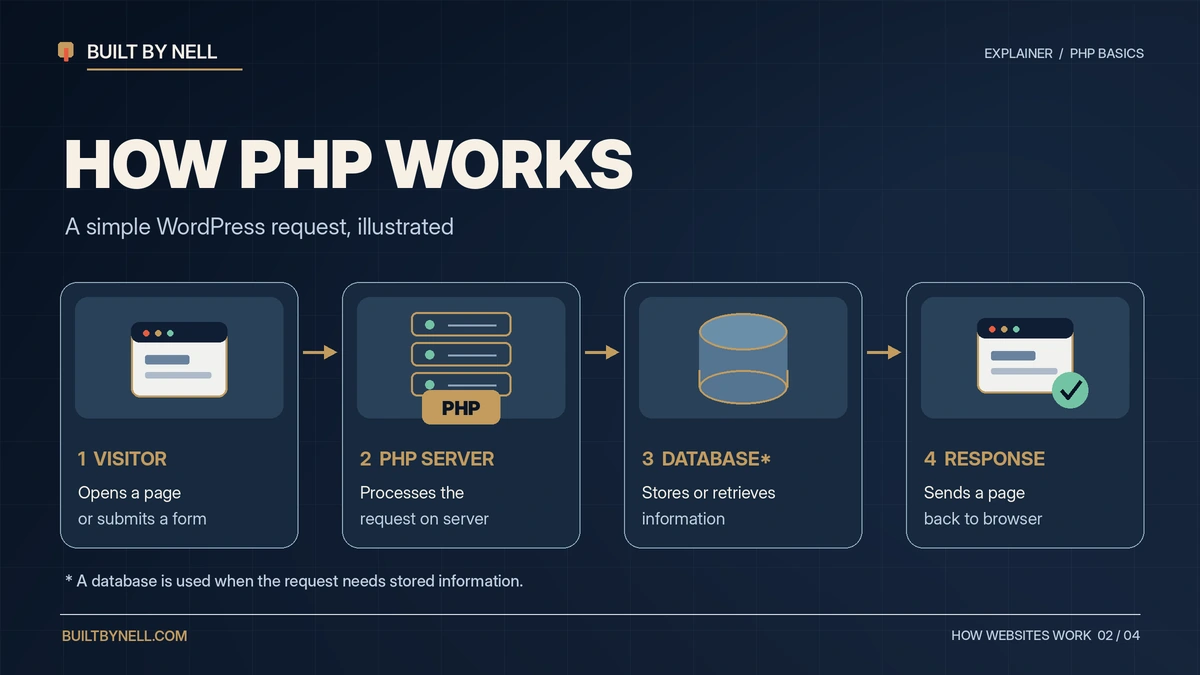
PHP is a programming language that works behind the scenes on websites like WordPress.
When someone visits your website, fills out a contact form, reads a blog post, or purchases something, PHP can help process those requests and communicate with your website’s database.
Think of it like the kitchen at a restaurant. You see the menu, place your order, and get your food. You don’t necessarily know everything happening behind those kitchen doors, but somebody back there is making things work.
That’s essentially what PHP does for many websites.
And when there’s a security issue in something that important, it’s worth paying attention.
So, What Happened With PHP2Shell?
On October 21, 2026, researchers disclosed two critical PHP security vulnerabilities, identified as CVE-2026-109618 and CVE-2026-109619.
Both received a severity rating of 9.2 out of 10.
NINE POINT TWO.
According to Wiz Research, the flaws went back to PHP 5.4, meaning they had been sitting in the software for more than a decade.
Now, before anybody starts panicking, this does NOT mean every WordPress website was hacked.
But on vulnerable, unpatched servers, attackers could potentially execute malicious code without logging in.
Depending on the vulnerability and how a server is configured, sensitive information could also be exposed.
And that’s where this becomes a business problem.
An additional PHP advisory was published on October 23, 2026, involving a separate, more limited issue. You can find the official updates on PHP’s website.
Why Should Business Owners Care?
Imagine putting months or years into building an online business, only to have your website suddenly become unavailable.
Now imagine you’re selling digital products, collecting customer emails, booking clients, or depending on that website to bring in money.
A successful security breach could potentially interrupt sales, expose sensitive information, or damage the trust you’ve worked so hard to establish.
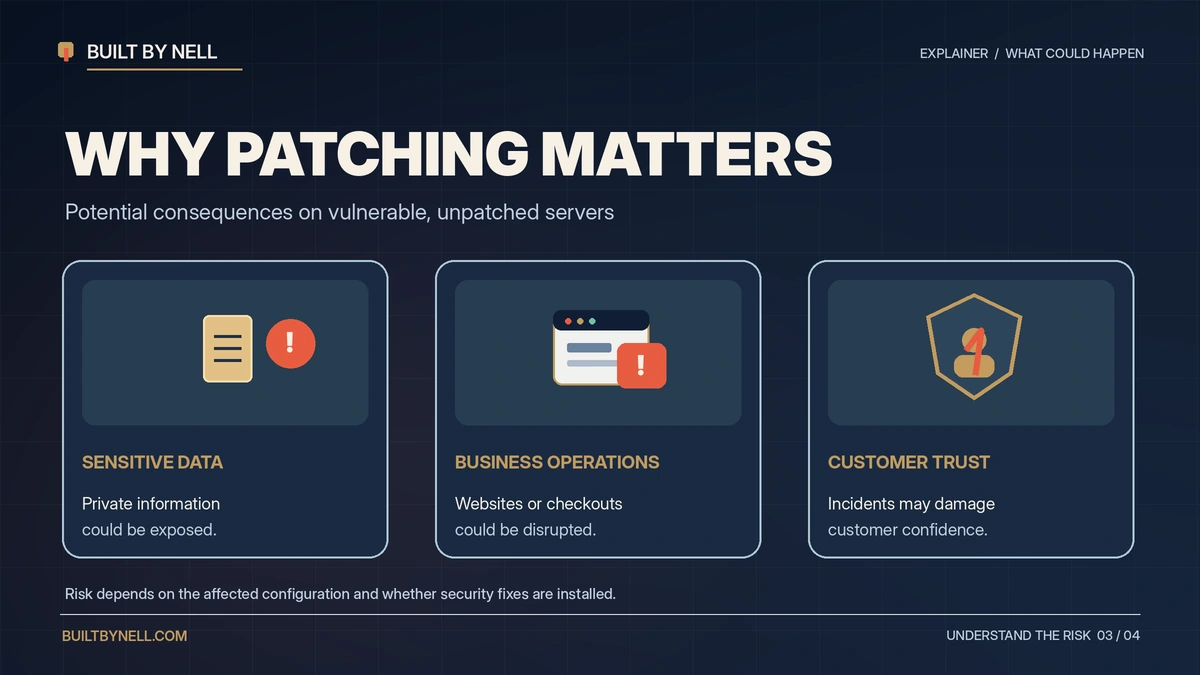
And rebuilding customer trust? That’s not something you can fix with a quick WordPress update.
That’s why this caught my attention.
Built By Nell isn’t just some random website I threw together. It’s part of the business I’m building, and I need it to function properly.
So instead of sitting around wondering whether I was protected, I decided to check.
How I Checked Built By Nell After the PHP2Shell Scare
My website is hosted through Hostinger’s Premium managed hosting plan.
That matters because Hostinger manages the PHP environment for my website. I wasn’t responsible for installing this particular server patch myself.
But I still wanted proof that the necessary protections were in place.
1. I checked my PHP security patch
I logged into Hostinger, went to my website dashboard, and found the PHP information.
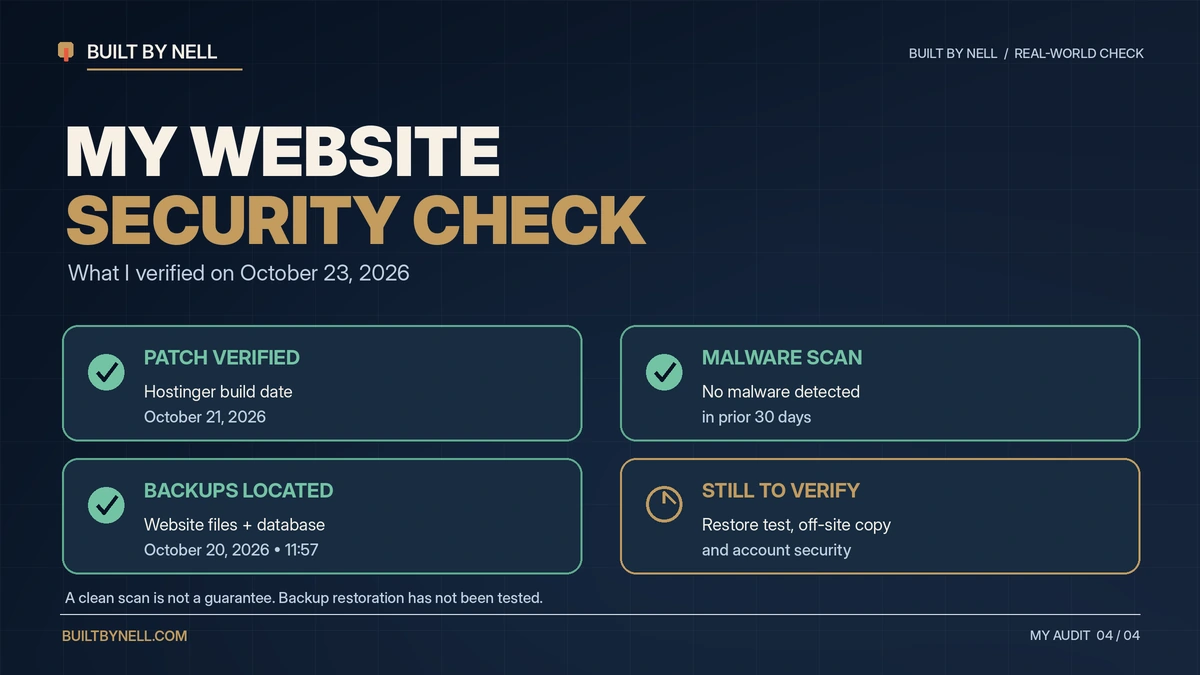
My website showed PHP version 8.3.35, with a Build Date of October 21, 2026.
Here’s where things got interesting.
The standard patched PHP 8.3 release is 8.3.36. So naturally, seeing 8.3.35 raised another question.
But Hostinger explained that it had incorporated the security fix into the PHP version already running on its managed servers.
According to Hostinger’s official announcement, a Build Date of October 21, 2026, or later confirms its PHP2Shell fix.
And yes, I appreciate them staying on top of this and explaining what customers needed to check. Shoutout to Hostinger for that!
One important thing: Don’t assume your PHP is patched just because you’re running the same version as me. Different hosting providers manage updates differently.
2. I checked for malware
Next, I went into Hostinger’s malware scanner.
The result?
No malware detected in the last 30 days.
Now, does that mean my website is guaranteed to be completely secure?
No.
A malware scanner can only detect what it’s designed to identify. But seeing a clean result was still reassuring.
3. I checked my website backups
This one was especially important to me.
Because what happens if something goes wrong and you need to recover your website?
I checked my backups and confirmed that I had recent copies of both my website files and database, dated October 20, 2026.
And if you’re wondering why you need both, here’s the simple explanation:
Your website files contain things like your themes, plugins, and uploaded media. Your database stores information like posts, pages, and settings.
You want both available if you ever need to rebuild your website.
I also requested downloadable copies so I could work on keeping an independent, protected backup.
That doesn’t mean I’ve completed a full restore test. That’s still something I need to verify.
4. I’m still checking the rest
And let me be clear, my security audit isn’t finished.
I still have additional account protections, WordPress updates, and backup verification to work through.
I’m sharing what I’ve actually completed, not pretending my entire website is magically protected forever.
How to Check Your Own WordPress Website Security
If you’re reading this thinking, “Okay, now I need to check my website,” here’s where I’d start.
- Contact your hosting provider. Ask whether the October 2026 PHP security patches have been applied to your hosting environment.
- Check your PHP information. Look at the version and any provider-specific patch or build information. Don’t assume a version number tells the entire story.
- Review your malware scanner. Check the latest results and investigate anything suspicious.
- Confirm your backups. Make sure you have recent backups of both your website files and database, ideally stored somewhere independent and protected.
- Review your WordPress updates. Check your plugins, themes, and WordPress installation. Remember, plugin updates don’t replace server-level PHP patches.
- Secure your logins. Enable two-factor authentication where supported, use strong passwords, and review who has administrator access.
- Make sure you can recover your site. Having a backup is great, but knowing it actually works is even better.
If you manage your own VPS or server, your responsibilities are different from someone on managed hosting. Follow the official PHP security guidance or work with someone qualified to handle those updates.
And please don’t start randomly switching PHP versions without checking compatibility first. We are trying to protect the website, not accidentally break it. 😂
Does That Little Website Padlock Actually Mean Anything?
Yes! The padlock is important.
It indicates that your connection to the website is encrypted through HTTPS.
But here’s what I learned: an encrypted connection does not automatically mean the website’s underlying software is secure.
Your website could have HTTPS enabled and still need updates or have other vulnerabilities.
So don’t ignore the padlock. Just don’t treat it like a complete security inspection.
Quick PHP2Shell Questions
Does PHP2Shell affect WordPress websites?
It can, because WordPress uses PHP. Whether a particular website is exposed depends on its PHP environment, configuration, and whether the relevant patches have been installed.
How do I know whether my website is patched?
Start with your hosting provider. Ask what PHP security updates they’ve deployed and how to verify them on your hosting plan.
Does a clean malware scan mean I’m safe?
Not necessarily. It’s one useful check, but you should also verify updates, backups, and account security.
Final Thoughts: Protect What You’re Building
Listen, building a business is already enough work. Now apparently we have to worry about security flaws that have been hanging around since 2012, too? Lovely. 😂
But seriously, this experience reminded me of something important.
It’s easy to get caught up in how your website looks, what you’re selling, and how many people are visiting.
But what about everything happening behind the scenes?
That matters, too.
I’m glad I checked my website instead of just assuming everything was fine. And I’m continuing to work through the areas that still need attention.
If you’re building something online, take a little time to check yours, too.
Protect what you’re building. You’ve already put too much into it not to.
I’m sharing more of what I learn as I build Built By Nell, from AI and content creation to business systems and the things nobody tells you about running a website.
If you’re figuring it out as you go, too, join my newsletter or follow @builtbynelllab on Instagram.
Because we’re learning, building, and making it work over here.
Sources: PHP Security Advisories | Wiz Research | Hostinger Security Update